CSS Opacity vs. Alpha: Transparent Backgrounds, Clear Text
Make a CSS background transparent without fading its text. Learn when to use opacity, RGB alpha or eight-digit hex, with copyable examples.
4 min read
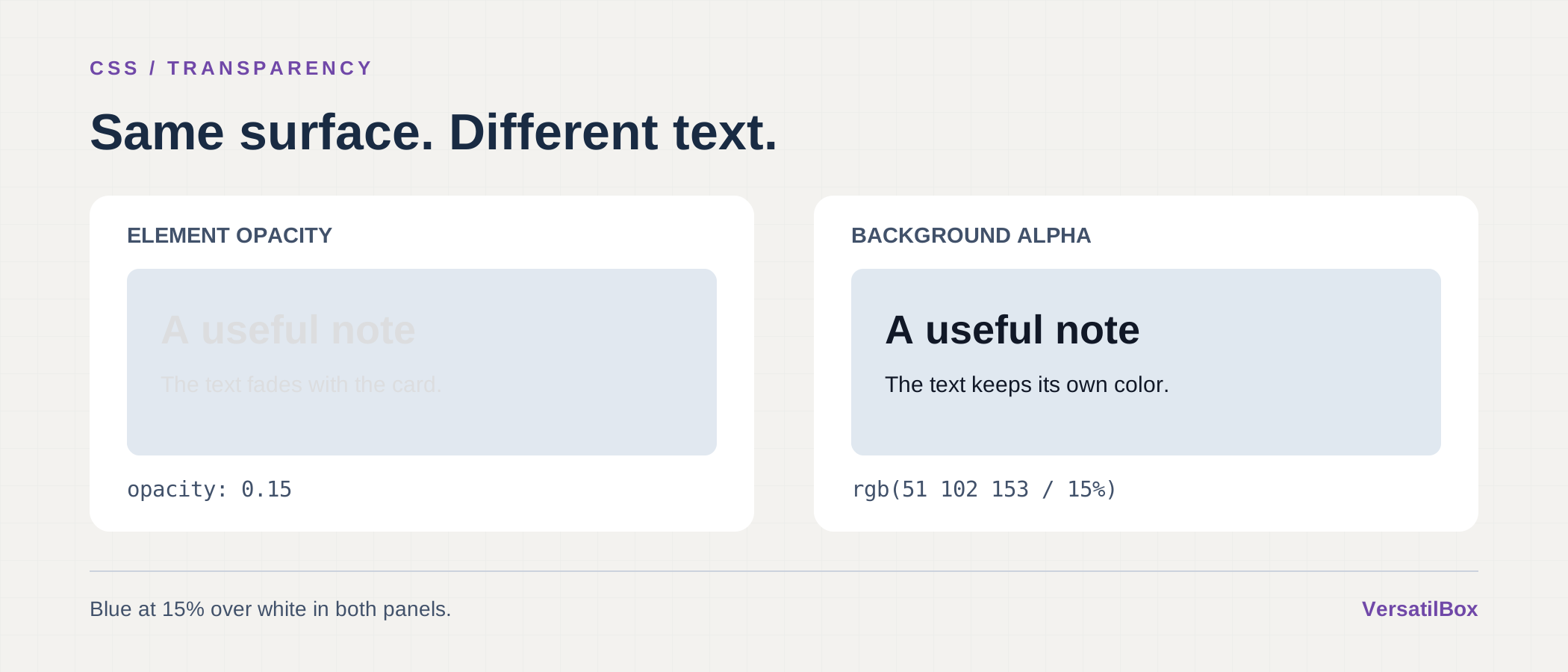
To make a CSS background transparent while keeping its text fully opaque, put an alpha value in background-color: for example, rgb(51 102 153 / 15%). Applying opacity: 0.15 to the card also fades everything inside it.
Both approaches can produce the same pale background over a white page. The difference becomes obvious as soon as you add a label or a button. Choosing where the transparency belongs lets you soften the surface without weakening the content.
Opacity vs. Alpha: What Actually Changes?
The opacity property controls the finished element as a group. Its background, borders and descendants are rendered together, then that result is composited onto the page. That is the model defined by CSS Color 4.
An alpha value belongs to a particular color. Set it on background-color and it affects that background paint. The text still uses its own color value.
Compare these two cards on white:
.faded-card {
  background-color: #336699;
  color: #111827;
  opacity: 0.15;
}

.tinted-card {
  background-color:
    rgb(51 102 153 / 15%);
  color: #111827;
}
The first card fades its dark text along with its blue surface. In the second, the surface has the same transparency, but the text remains dark. The second example assumes no ancestor is already applying opacity.
Use group opacity when the whole object should fade, such as a decorative illustration. For a tinted information panel that people need to read, give the background color its own alpha.
Why Opacity: 1 on a Child Does Not Fix Faded Text
Adding opacity: 1 to a heading inside .faded-card cannot restore its original appearance. The heading is still part of the group that the parent fades.
This can be confusing because opacity is not inherited. A child can have a computed opacity of 1 and still look transparent on screen. MDN’s opacity reference explains the distinction between inheritance and the effect on an element’s contents.
Move the transparency into the parent’s background color and remove the parent’s reduced opacity. If the problem remains, inspect the ancestors too. A wrapper several levels above the heading can be responsible.
RGB Alpha and Eight-Digit Hex in CSS
In modern rgb() syntax, write the color channels separated by spaces, then a slash and the alpha:
.panel {
  background-color:
    rgb(51 102 153 / 50%);
}
Alpha 0 means fully transparent; 1 means fully opaque. Percentages express the same scale, so 50% and 0.5 are equivalent. Higher alpha means more opacity.
If you use comma syntax, the equivalent color is rgba(51, 102, 153, 0.5). CSS defines rgba() as an alias of rgb(). Keep the separators consistent within a declaration; the W3C RGB syntax documents both forms.
Eight-digit hex puts alpha last: #RRGGBBAA. For example, #33669980 is the same blue with an alpha of 128/255, approximately 50.2%. The final 80 is hexadecimal, not an 80% setting. 00 is fully transparent and FF is fully opaque, as specified in the CSS hex notation.
For an exact 50% value in your source code, rgb(51 102 153 / 50%) communicates the intention more clearly. Eight-bit hex alpha cannot represent exactly one half because there is no integer halfway between 0 and 255.
Start with a solid hex value in the color converter to find its RGB channels. For #336699, those are 51, 102 and 153. Then add / 15% inside the space-separated rgb() expression in your stylesheet.
Why a Transparent Color Changes With Its Background
A translucent color has no single final appearance without a backdrop. The blue panel above will look different over a dark page or a photograph than it does over white.
For ordinary source-over compositing onto an opaque background, each resulting color channel follows this relationship:
Result = foreground × alpha + background × (1 − alpha)
This is the opaque-background case of the W3C alpha compositing formula. The channel values must be expressed in the same compositing color space.
Overlapping translucent layers change the result again. Two separate 50%-alpha black overlays leave 25% of an opaque backdrop’s contribution visible: one half of one half. Together, they behave like a 75%-alpha black overlay, not a fully opaque one.
That matters for nested panels. If each container adds its own translucent fill, overlapping regions can become darker than the mockup suggests.
Check the Text Against the Finished Surface
Keeping the text opaque avoids accidental fading; it does not guarantee readable contrast. Review the actual combination of text, translucent fill and whatever sits behind it. A panel over an image needs checking where that image is lightest and darkest, as well as in each supported theme.
If the background varies too much, use a more opaque fill or a solid surface behind the text. Our guide to WCAG contrast explains how to evaluate the resulting foreground and background pair.
For a readable tinted card, start with a solid text color, put alpha in the background declaration, and adjust it while looking at the real page. Save opacity for the cases where fading the whole group is the intended effect.