GB vs. GiB: Why Storage Sizes Look Different
Learn the difference between GB and GiB, why 1 TB equals about 931 GiB, and how to set file size limits without mixing decimal and binary units.
4 min read
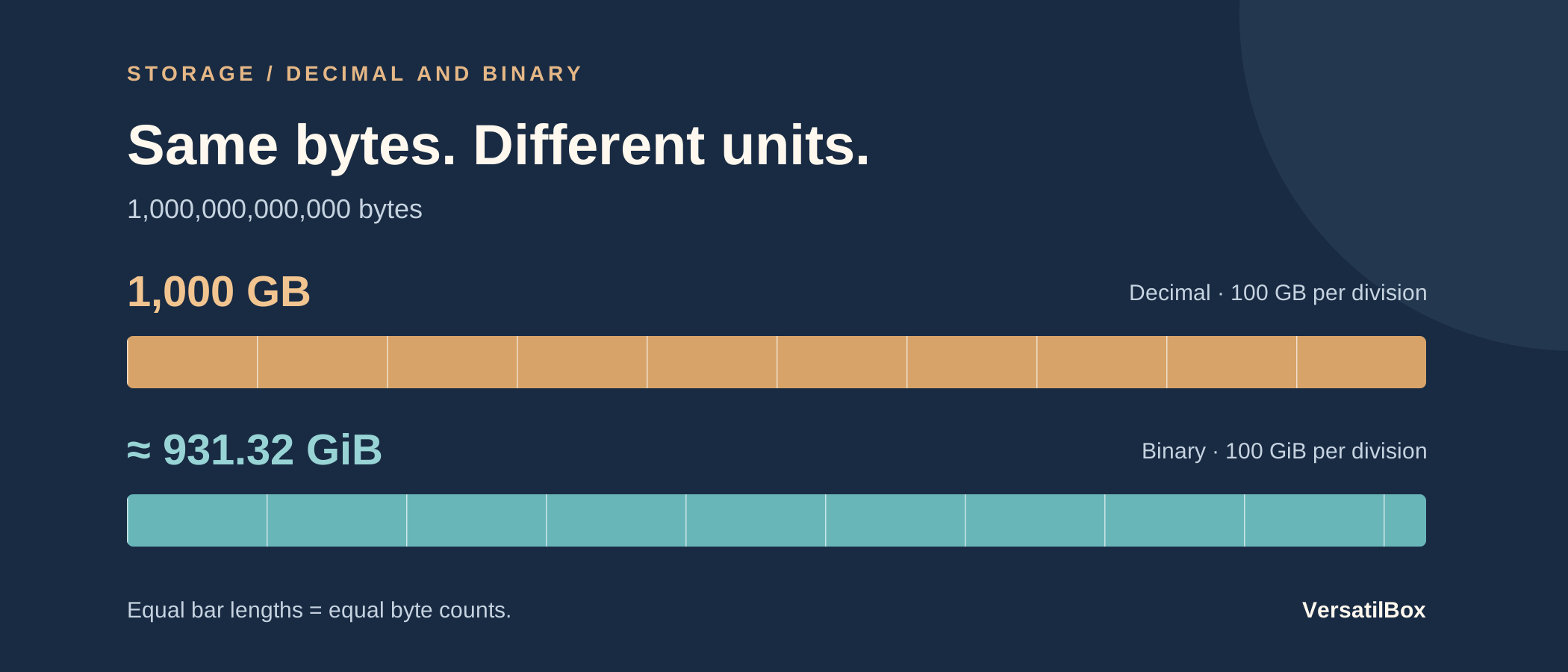
A gigabyte (GB) is 1,000,000,000 bytes. A gibibyte (GiB) is 1,073,741,824 bytes. They measure the same kind of quantity using different-sized units, so the same file or drive has a smaller numerical size in GiB.
That is why one trillion bytes equals 1,000 GB but about 931.32 GiB. Changing the unit does not remove any bytes. Formatting and stored files can reduce available space too, but those are separate effects.
What Is the Difference Between GB and GiB?
Decimal prefixes scale by powers of 1,000. Binary prefixes scale by powers of 1,024. The NIST reference on binary prefixes gives the exact byte counts:
- 1 MB: 1,000,000 bytes, or 1,000 squared.
- 1 MiB: 1,048,576 bytes, or 1,024 squared.
- 1 GB: 1,000,000,000 bytes, or 1,000 cubed.
- 1 GiB: 1,073,741,824 bytes, or 1,024 cubed.
The extra i is part of the unit symbol. MiB means mebibyte; GiB means gibibyte. It is not a different spelling for the decimal unit.
The IEC explanation of binary prefixes describes why distinct names were introduced: computing had used decimal names for binary quantities, creating ambiguity. Explicit symbols let you tell which multiplier a number uses without guessing from context.
Bytes and bits are a separate distinction. One byte is eight bits, so changing from GB to GiB does not involve dividing by eight. Both units here count bytes.
Why Does a 1 TB Drive Look Like About 931 GB?
Consider a nominal capacity of exactly 1,000,000,000,000 bytes, or 1 TB. Count those bytes in decimal gigabytes:
1,000,000,000,000 ÷ 1,000,000,000 = 1,000 GB
Now count them in gibibytes:
1,000,000,000,000 ÷ 1,073,741,824 ≈ 931.32 GiB
If an application uses the second calculation but labels the result “GB,” the screen looks inconsistent with the product label. The technically precise label for that binary result is GiB. Check the application’s definition before treating the difference as lost capacity.
Apple’s storage measurement guide explains the distinction between decimal capacities on product specifications and binary reporting in some software. It also identifies formatting and the operating system as consumers of storage space.
The 931.32 figure above describes the unit conversion before accounting for space used on the drive. It is not a promise about the free space a newly purchased device will report. Compare total capacity with total capacity; comparing a package label with an “available” figure mixes two questions.
How to Convert GB to GiB
Use the ratio of the two unit sizes:
GiB = GB ÷ 1.073741824
For the reverse direction:
GB = GiB × 1.073741824
For example, 16 GiB equals 17.179869184 GB. If you only need a readable label, about 17.18 GB may be enough. Preserve the exact byte count when making a storage comparison or enforcing a limit; round the number displayed to the reader afterward.
Decimal conversions stay within the powers-of-1,000 system. In the data converter, 1 GB becomes 1,000 MB. That tool uses decimal units; use the formula above when your starting figure is in GiB.
A useful sense check is the direction of the change: GiB is the larger unit, so converting a fixed byte count from GB to GiB should make the number smaller.
MB vs. MiB for Website Upload Limits
Suppose you are writing the upload instructions for a website. A limit of 25 MB means 25,000,000 bytes. A limit of 25 MiB means 26,214,400 bytes. The difference is 1,214,400 bytes, enough for a file to fit one limit and exceed the other.
Imagine a file containing exactly 25,500,000 bytes:
- Against a 25 MB limit, it is 500,000 bytes too large.
- Against a 25 MiB limit, it fits, with 714,400 bytes remaining.
Neither limit is inherently the right choice for every site. The problem is choosing one in the implementation and naming the other in the interface.
For a decimal limit, document it as “Maximum file size: 25 MB (25,000,000 bytes).” For a binary limit, use “25 MiB (26,214,400 bytes).” Compare the actual byte count with that threshold, rather than a rounded size label. A label can hide the small difference that determines whether an upload is accepted.
The same habit helps when comparing hosting quotas or planning an image library: establish the unit first, then do the arithmetic. If a service gives only an ambiguous abbreviation, check its documentation for the byte definition.
Read the Unit Before Comparing the Number
When two size readings disagree, check whether both represent total capacity or free space. Then look for an exact byte count or an explicit GB/GiB definition. Convert both readings into the same unit before comparing them.
Keep the byte count as your reference. A different label can change the number you see; formatting and stored content change how much space is available. Separating those effects makes the comparison useful.